


Cookie giúp chúng tôi cung cấp các dịch vụ của mình. Đồng nghĩa với việc sử dụng được dịch vụ của chúng tôi, Bạn đồng ý với việc sử dụng cookie của chúng tôi ?
Bạn không có sản phẩm nào trong giỏ hàng của bạn.

Máy ảo - Điện toán Đám mây - Siêu máy tính - Bảo vệ dữ liệu
Tài liệu hướng dẫn hoặc sách tham khảo cung cấp kiến thức về Virtual Desktop Infrastructure (VDI), Cloud Computing, High-Performance Computing (HPC) và Backup/Disaster Recovery (DR). Cuốn sách này thường dành cho các chuyên gia IT, quản trị hệ thống, quản trị mạng và những ai quan tâm đến việc triển khai, quản lý và bảo vệ hệ thống thông tin trong môi trường doanh nghiệp.
Nội Dung Thông Thường Trong "VDI, Cloud, HPC vs Backup DR Handbook":
-
Virtual Desktop Infrastructure (VDI):
- Giải thích về VDI, cách nó hoạt động và lợi ích của việc triển khai VDI trong môi trường doanh nghiệp.
- Hướng dẫn về cách thiết kế, triển khai và quản lý hệ thống VDI hiệu quả.
-
Cloud Computing:
- Tổng quan về Cloud Computing, các mô hình dịch vụ Cloud và ưu điểm của việc sử dụng Cloud trong doanh nghiệp.
- Hướng dẫn về cách chuyển đổi hệ thống sang môi trường Cloud và quản lý tài nguyên Cloud hiệu quả.
-
High-Performance Computing (HPC):
- Đề cập đến HPC, cách nó được sử dụng trong các ứng dụng đòi hỏi tính toán cao và cách tối ưu hóa hiệu suất tính toán.
- Hướng dẫn về cách xây dựng và quản lý cụm tính toán HPC để đáp ứng nhu cầu tính toán phức tạp.
-
Backup and Disaster Recovery (DR):
- Bảo mật dữ liệu và khôi phục dữ liệu sau thảm họa là một phần quan trọng của quản lý hệ thống thông tin.
- Hướng dẫn về cách thiết lập và thực hiện kế hoạch sao lưu và khôi phục dữ liệu hiệu quả trong trường hợp xảy ra sự cố.
Lợi Ích của "VDI, Cloud, HPC vs Backup DR Handbook":
- Hiểu Biết Sâu Rộng: Giúp người đọc hiểu rõ về các công nghệ quan trọng như VDI, Cloud, HPC và Backup/DR.
- Hướng Dẫn Chi Tiết: Cung cấp hướng dẫn cụ thể về triển khai, quản lý và bảo vệ các hệ thống IT.
- Tối Ưu Hóa Hiệu Suất: Hỗ trợ trong việc tối ưu hóa hiệu suất và đảm bảo an toàn thông tin trong môi trường doanh nghiệp.
Đầu sách "VDI, Cloud, HPC vs Backup DR Handbook" là nguồn kiến thức hữu ích để giúp người đọc nắm vững và áp dụng các công nghệ và chiến lược quan trọng trong quản lý hệ thống thông tin.

Mastering VMware Horizon 8: An Advanced Guide to Delivering Virtual Desktops and Virtual Apps
Learn all about designing, installing, configuring, and managing VMware Horizon, with a core focus on how to deliver virtual desktops using Horizon. This book allows you to follow the complete process for deploying VMware Horizon and covers the design, deployment, and management of solutions.
$59.99
$44.99

Delivering Applications With VMware App Volumes 4: Delivering Application Layers to Virtual Desktops Using VMware
Acquire the skills to build an App Volumes environment for a proof of concept, a pilot, or a live production environment. Delivering Applications with VMware App Volumes 4 starts with an in-depth overview of where the solution fits within the market and its key features, introducing you to application layering and VMware App Volumes. Next, it explains how to install the software and use its management consoles to configure App Volumes. You will understand how to build and configure application layers for delivery and will learn to build and configure writeable volumes for user data and user-installed applications.
$49.99
$39.99
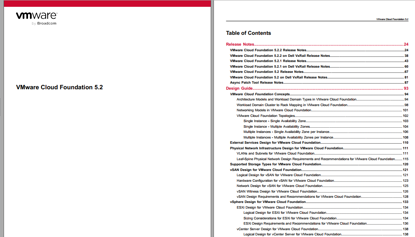
VMware Cloud Foundation 5.2.2
You can install VMware Cloud Foundation 5.2.2 as a new release or perform a sequential or skip-level upgrade to
VMware Cloud Foundation 5.2.2.
Installing as a New Release
The new installation process has three phases:
• Phase One: Prepare the Environment: The Planning and Preparation Workbook provides detailed information about
the software, tools, and external services that are required to implement a Software-Defined Data Center (SDDC) with
VMware Cloud Foundation, using a standard architecture model.
• Phase Two: Image all servers with ESXi: Image all servers with the ESXi version mentioned in the Cloud Foundation
Bill of Materials (BOM) section. See the VMware Cloud Foundation Deployment Guide for information on installing
ESXi.
• Phase Three: Install Cloud Foundation 5.2.2: See the VMware Cloud Foundation Deployment Guide for information
on deploying Cloud Foundation.
$1,998.00
$1,600.00
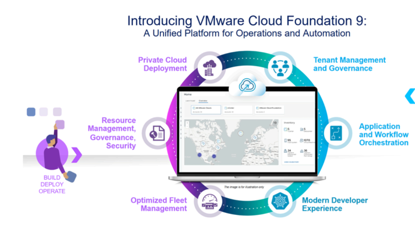
VMware Cloud Foundation 9.0
What's New
Following are the key features and capabilities of VMware Cloud Foundation 9.0:
One Interface to Private Cloud Operations
VMware Cloud Foundation 9.0 offers a streamlined experience for building, operating, and securing private cloud - all from a single interface. VCF Operations provides a new Operate Experience, and along with the new build experiences provided by the VCF Installer you have quick deployment with integrated governance to get you up and running faster, reducing setup time and complexity while ensuring compliance and operational efficiency from day one through cost management and policy enforcement.
Read More in the VCF Operations What's New section.
One Interface For A Cloud Consumption Experience
VMware Cloud Foundation 9.0 offers a frictionless, cloud-like experience for teams consuming infrastructure—delivered through a single, unified interface. VCF Automation enables IT teams and Cloud Service Providers to deliver a self-service private cloud for application teams. The self-service private cloud comes built-in with a rich set of cloud services to provision VMs, Kubernetes, Networking, Volumes, Secret Store, Databases, Harbor Container Registries, External DNS, Certificates and AI workloads.
Read More in the VCF Automation What’s New section.
Run Containers, VMs and Traditional Apps Natively With VMware Cloud Foundation 9.0, you get a unified platform to run containers, VMs, and enterprise applications natively
$1,998.00
$1,600.00